
WeighVue Desktop
A legal-for-trade weighbridge application that manages the full weigh-in/weigh-out workflow from any Windows workstation. Capture weights, record transactions, print tickets, and keep your operation running whether you are online or off the grid.
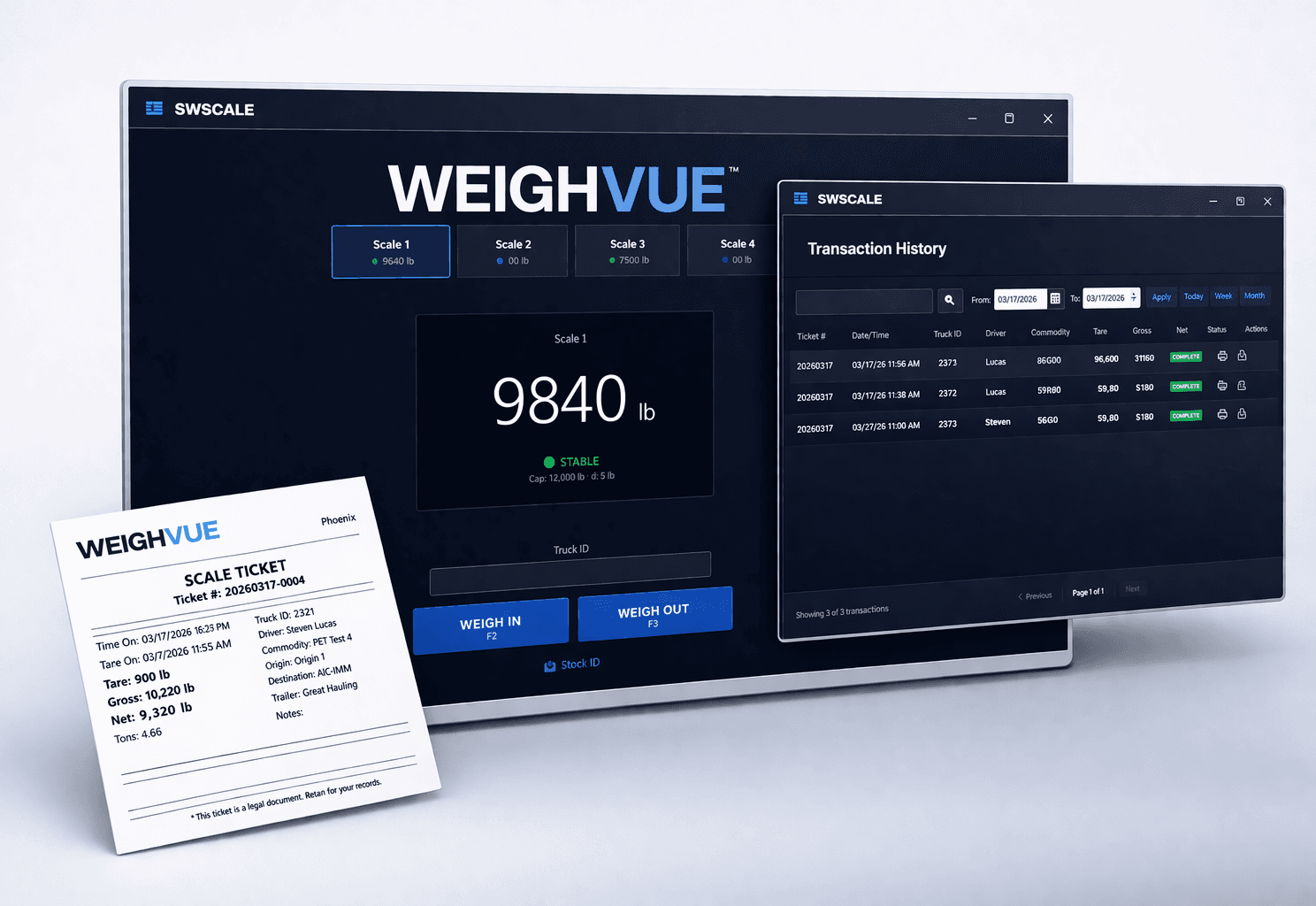
Everything You Need at the Scale
WeighVue Desktop handles the complete transaction lifecycle: weigh-in, data entry, weigh-out, ticket printing, and reporting. All in one application, all from one screen.

Two-Step Weigh-In / Weigh-Out
Capture the inbound weight when the truck arrives, then complete the outbound weight when it returns. Net weight is calculated automatically.

Stored Tare
Register a truck's tare weight once and skip the weigh-in step on every future load. Tare values are securely stored and expire on a configurable schedule.

Multi-Scale Support
Connect up to four scales at the same time. Each scale runs independently with its own connection and status display.

Automated Ticketing
Tickets print the instant a transaction completes. Configure templates with gross, tare, net, tonnage, timestamps, logos, signatures, and any custom field.

Offline Capable
Keep weighing when the network goes down. A local database stores every transaction and syncs automatically when connectivity returns.

Full Transaction History
Search, filter by date, reprint tickets, void transactions, and export to CSV. Every record is stored with complete audit detail.

Manual Weight Entry
If scale communication is lost, operators can enter weights manually. Manual entries are clearly labeled on tickets and logged in the audit trail.

Signature Capture
Capture driver signatures on a connected pad and print them directly on weigh tickets for proof of delivery and compliance.

Light and Dark Mode
Switch between a bright daytime interface and a dark theme for nighttime or low-light scale houses. The layout adapts from full-screen to quarter-screen.
Connects to Virtually Any Scale
Built-in protocol support for Rice Lake, Cardinal, Mettler Toledo, Fairbanks, Avery Weigh-Tronix, and more. If your indicator isn't on the list, we can configure it for you.

Serial and TCP
Connect via RS-232 serial or TCP/IP. Each scale has independent connection settings.

15+ Indicator Presets
Built-in support for Rice Lake, Cardinal, Mettler Toledo, Fairbanks, Avery Weigh-Tronix, Ohaus, and more.

Live Scale Status
See real-time weight, stability, and connection status on the main screen for every connected scale.
Ticketing and Reporting
Every completed transaction generates a professional weigh ticket instantly. Search, filter, reprint, void, or export your full transaction history at any time.
Custom Ticket Templates
Tickets are customized for your site with your logo, fields, and layout. Output to PDF, thermal receipt printers, or Zebra label printers.
Instant Reprint
Reprint the last ticket with a single key press (F5), or open History and reprint any past transaction by ticket number.
Void with Audit Trail
Admin-authorized voids require a reason and PIN. Voided transactions are preserved in history with a permanent audit record.
CSV Export
Export any date range of transactions to a standard CSV file including ticket number, weights, timestamps, and all business fields.
Tonnage and Net Calculations
Automatic net weight and tonnage calculations on every ticket. Both values display in history and export to CSV for easy billing and reconciliation.
Signature on Ticket
Place the captured driver signature directly on the printed PDF ticket for a complete, self-contained record of each load.
Security and Compliance Built In
NTEP approved under CC: 26-032. Your weight records are protected, your audit trail is automatic, and your data never leaves your site.

Protected Weight Records
Every weight capture is digitally signed the moment it is recorded, so you always have a trustworthy, verifiable history.

Complete Audit Trail
Every weigh-in, weigh-out, void, and configuration change is automatically logged with the operator, date, and time.

Role-Based Access
Control who can weigh, who can void, and who can change settings with three simple access levels, all secured by PIN.

Your Data Stays on Your Site
All transaction data is stored locally on your own hardware. Nothing is sent to the cloud, so your records stay under your control at all times.
Configurable for Any Site
Every operation is different. WeighVue Desktop is fully customizable so your transaction fields, dropdown lists, tickets, and features match exactly what your site needs.

Custom Transaction Fields
Define exactly which fields operators see: customer, driver, commodity, hauler, project, notes, and more. Make any field required or optional.

Lookup Tables
Pre-load customers, drivers, haulers, and commodities into searchable dropdown lists. Operators pick from the list instead of typing, so data stays clean and consistent.

Customized Tickets for Your Site
Tickets are tailored to your operation with your logo, fields, and layout. Print to PDF, thermal, or Zebra label printers.
Why WeighVue Desktop?

Simple to Operate
Operators learn the interface in minutes. Keyboard shortcuts (F2 weigh-in, F3 weigh-out, F5 reprint) keep transactions fast and consistent.

Works Anywhere
Runs on any Windows 10/11 PC. No internet required. Perfect for remote pits, portable scales, and scale houses with unreliable connectivity.

Fully Configurable
Custom fields, feature toggles, and starter templates mean every site gets a setup tailored to its exact workflow.