
WeighVue Imports
Pull your transaction data off the indicator whenever you need it.WeighVue Imports is a lightweight desktop application that connects to your Rice Lake 1280 over Ethernet, downloads the stored database, and gives you a clean CSV file. No server, no cloud, no complexity.
How It Works
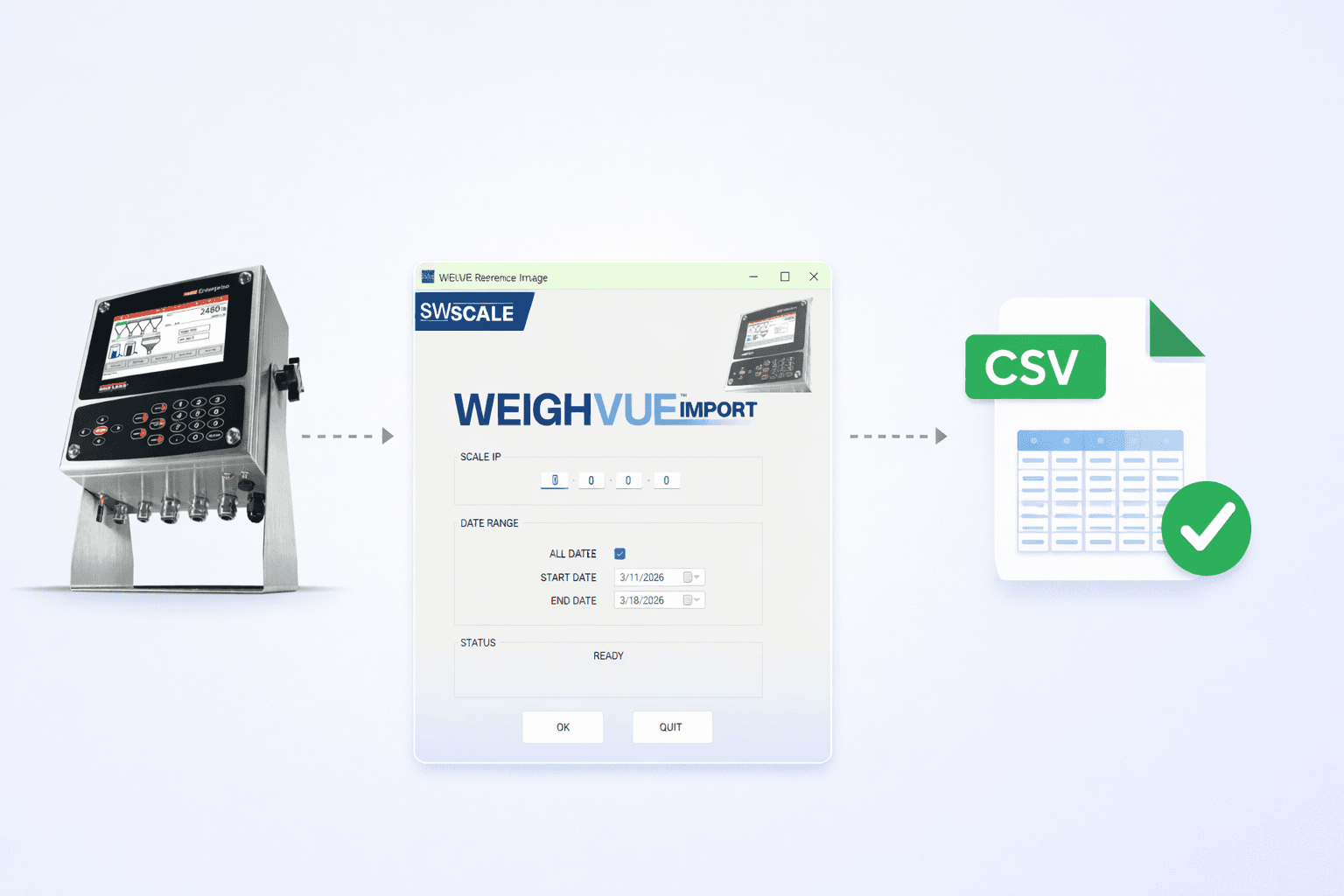
Install it on any Windows PC that is on the same network as your 1280 indicator. When you need your data, open the application, click import, and your transactions are pulled down and saved as a CSV file. That is it.
Connect
Install the application on any Windows PC that has network access to your Rice Lake 1280 indicator over Ethernet.
Import
Open the application and click import. WeighVue Imports pulls the stored transaction database directly from the indicator.
Export
Your transactions are saved as a CSV file that you can open in Excel, import into accounting software, or archive.
Simple by Design
WeighVue Imports does one thing and does it well. No databases to manage, no dashboards to configure, no accounts to create. Just your transaction data in a file you can open in Excel or feed into any system you already use.

On-Demand Pulls
Import data whenever you need it. No schedules, no background services. Open the app, click import, and your data is there.

Clean CSV Output
Every import produces a standard CSV file. Open it in Excel, feed it into your ERP, or archive it. No proprietary formats.

Ethernet Connection
Connects to the 1280 over your existing Ethernet network. No special cables, no serial adapters, no direct connections required.

Local to Your Machine
Runs entirely on the PC where it is installed. No server, no cloud, no network shares. Your data stays on your machine.

Lightweight Install
A small, simple installer with no dependencies to configure. Install it and start importing in minutes.

Built for the 1280
Designed specifically to work with the Rice Lake 1280 indicator. It knows the database format and pulls exactly what you need.
What You Need
WeighVue Imports has minimal requirements. If you have a 1280 indicator and a PC on the same network, you are ready to go.
Rice Lake 1280
WeighVue Imports is designed for the Rice Lake 1280 indicator. The indicator must have an Ethernet connection configured.
Windows PC
Any Windows machine on the same network as your indicator. No special hardware or elevated privileges required.
Ethernet Network
The PC and the indicator must be on the same network. Connection is made over standard Ethernet, no serial or USB.
That Is It
No database server, no cloud subscription, no IT infrastructure. Install the app and start pulling data.
Imports vs. DB+
Both products work with the Rice Lake 1280, but they serve different needs. Imports is for pulling data on demand from a single machine. DB+ is a full database and LAN dashboard with multi-user access.
WeighVue Imports
- Desktop application on a single PC
- On-demand data pulls, no background services
- Exports CSV files only
- Local to the machine where it is installed
- No multi-user access or LAN dashboard
- Simple, lightweight, no infrastructure
WeighVue DB+
- Database and LAN dashboard on the indicator
- Continuous transaction logging in real time
- Search, filter, and generate reports in a browser
- Multi-user authentication with role-based access
- Accessible from any device on the network
- Full-featured data management platform
Why WeighVue Imports?

Dead Simple
No configuration, no training, no ongoing maintenance. Install it, point it at your indicator, and pull your data whenever you need it.
Zero Infrastructure
No servers, no databases, no cloud subscriptions. Just a small desktop application and the network connection you already have.
Your Data, Your Way
Get a standard CSV file you can use however you want. Open it in Excel, import it into your accounting system, or just archive it for your records.